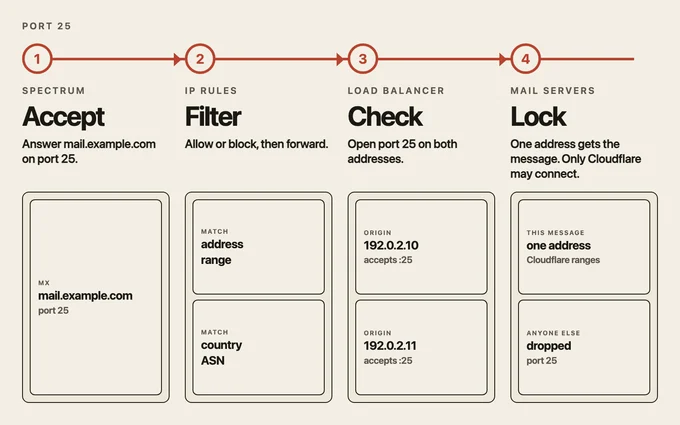
Spectrum accepts SMTP on port 25 for mail.example.com. The MX record for example.com points at that name. Spectrum hands the connection to the load balancer lb.mail.example.com.
lb.mail.example.com is a different name, and its proxy is on. The pool is not a list of hostnames. Each origin is an IP address. The monitor opens a TCP connection to port 25 on 192.0.2.10 and on 192.0.2.11. Each address that accepts that check is healthy. Steering gives this SMTP connection to one of those addresses. The other stays ready for the next connection.
example.com
  MX -> mail.example.com:25
    Spectrum
      IP access rules
      lb.mail.example.com
        192.0.2.10:25  accepts the check
        192.0.2.11:25  accepts the check
        this message -> one of those addresses
On the Spectrum application, the origin type is Load Balancer and the selection is lb.mail.example.com. The server at the chosen address sees a Cloudflare address as the source, because the load balancer is proxied.
On 192.0.2.10 and on 192.0.2.11, allow port 25 from Cloudflare's published ranges, and drop port 25 from every other source.
https://www.cloudflare.com/ips-v4
https://www.cloudflare.com/ips-v6
The health check and the SMTP connection both come from those ranges, so both servers still accept them. A direct connection to either address on port 25 does not.
Turn IP Access rules on for the Spectrum application. A rule matches an address, a range, a country, or an ASN. The action is allow or block. Spectrum applies the rule, then the load balancer chooses 192.0.2.10 or 192.0.2.11. The server at that address speaks SMTP.
Leave session affinity, failover across pools, and custom rules off. The load balancer's job here is the port 25 check on both addresses, and steering between the ones that accepted it.
192.0.2.10 and 192.0.2.11 are documentation addresses.